


Which GTA VI controller layout should I use on PS5 or Xbox?
Compare the Default, Classic and Left-Handed presets in GTA6NewsHub’s community controller guide. Each table lists the PlayStation input first and the Xbox input second. Check your in-game settings if you use custom bindings. [1]
Slide guide
Key takeaways
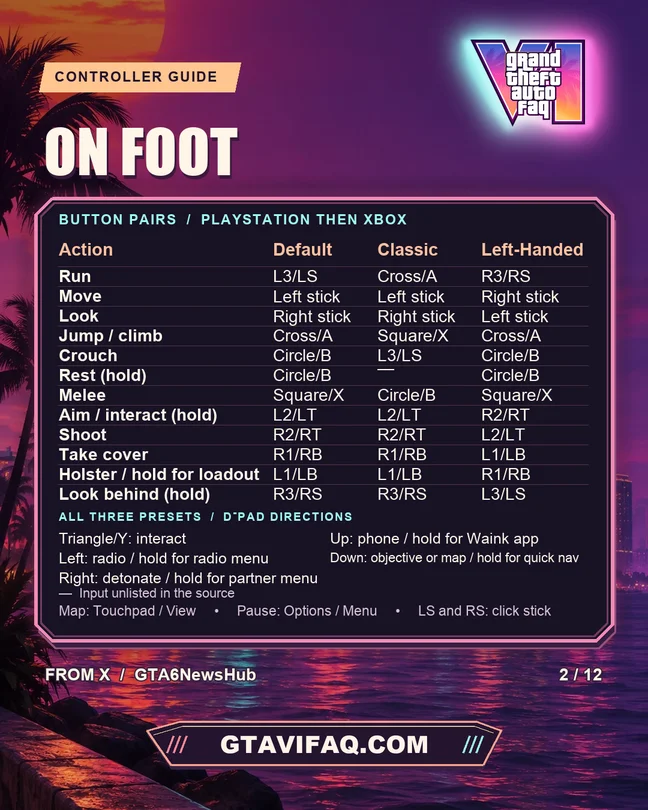
- Read each row in this order: Default, Classic, Left-Handed. Within each pair, PlayStation comes first. A dash means the source lists no input. [2]
- Run — L3/LS, Cross/A, R3/RS. [2]
- Move — Left stick, Left stick, Right stick. [2]
- Look — Right stick, Right stick, Left stick. [2]
- Jump / climb — Cross/A, Square/X, Cross/A. [2]
- Crouch — Circle/B, L3/LS, Circle/B. [2]
- Rest (hold) — Circle/B, —, Circle/B. [2]
- Melee — Square/X, Circle/B, Square/X. [2]
- Aim / interact (hold) — L2/LT, L2/LT, R2/RT. [2]
- Shoot — R2/RT, R2/RT, L2/LT. [2]
- Take cover — R1/RB, R1/RB, L1/LB. [2]
- Holster / hold for loadout — L1/LB, L1/LB, R1/RB. [2]
- Look behind (hold) — R3/RS, R3/RS, L3/LS. [2]
- Across all presets: Triangle/Y: interact. [2]
- Across all presets: Up: phone / hold for Waink app. [2]
- Across all presets: Left: radio / hold for radio menu. [2]
- Across all presets: Down: objective or map / hold for quick nav. [2]
- Across all presets: Right: detonate / hold for partner menu. [2]
- On all presets, open the map with Touchpad / View and pause with Options / Menu. LS and RS mean a stick click. [2]
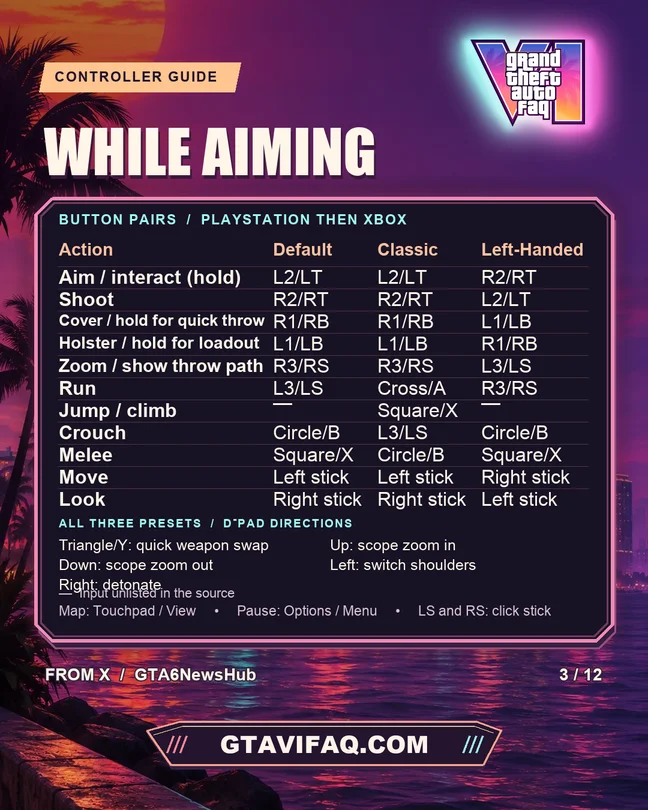
- Cover / hold for quick throw — R1/RB, R1/RB, L1/LB. [3]
- Zoom / show throw path — R3/RS, R3/RS, L3/LS. [3]
- Jump / climb — —, Square/X, —. [3]
- Across all presets: Triangle/Y: quick weapon swap. [3]
- Across all presets: Up: scope zoom in. [3]
- Across all presets: Down: scope zoom out. [3]
- Across all presets: Left: switch shoulders. [3]
- Across all presets: Right: detonate. [3]
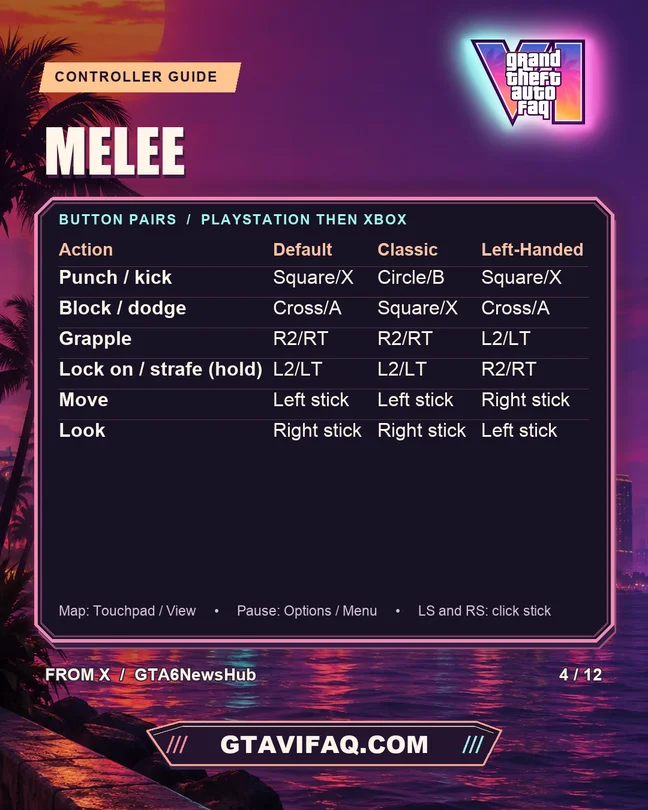
- Punch / kick — Square/X, Circle/B, Square/X. [4]
- Block / dodge — Cross/A, Square/X, Cross/A. [4]
- Grapple — R2/RT, R2/RT, L2/LT. [4]
- Lock on / strafe (hold) — L2/LT, L2/LT, R2/RT. [4]
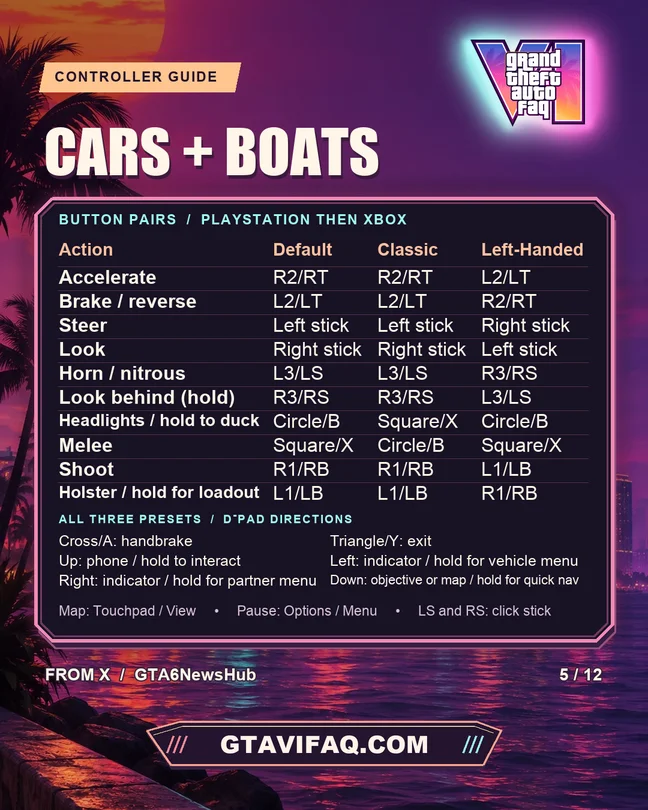
- Accelerate — R2/RT, R2/RT, L2/LT. [5]
- Brake / reverse — L2/LT, L2/LT, R2/RT. [5]
- Steer — Left stick, Left stick, Right stick. [5]
- Horn / nitrous — L3/LS, L3/LS, R3/RS. [5]
- Headlights / hold to duck — Circle/B, Square/X, Circle/B. [5]
- Shoot — R1/RB, R1/RB, L1/LB. [5]
- Across all presets: Cross/A: handbrake. [5]
- Across all presets: Triangle/Y: exit. [5]
- Across all presets: Up: phone / hold to interact. [5]
- Across all presets: Left: indicator / hold for vehicle menu. [5]
- Across all presets: Right: indicator / hold for partner menu. [5]
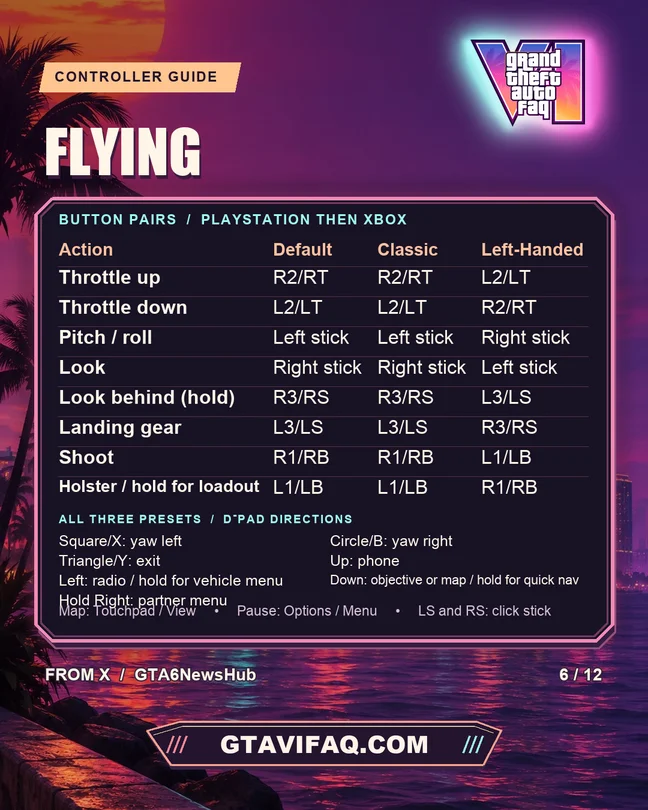
- Throttle up — R2/RT, R2/RT, L2/LT. [6]
- Throttle down — L2/LT, L2/LT, R2/RT. [6]
- Pitch / roll — Left stick, Left stick, Right stick. [6]
- Landing gear — L3/LS, L3/LS, R3/RS. [6]
- Across all presets: Square/X: yaw left. [6]
- Across all presets: Circle/B: yaw right. [6]
- Across all presets: Up: phone. [6]
- Across all presets: Left: radio / hold for vehicle menu. [6]
- Across all presets: Hold Right: partner menu. [6]
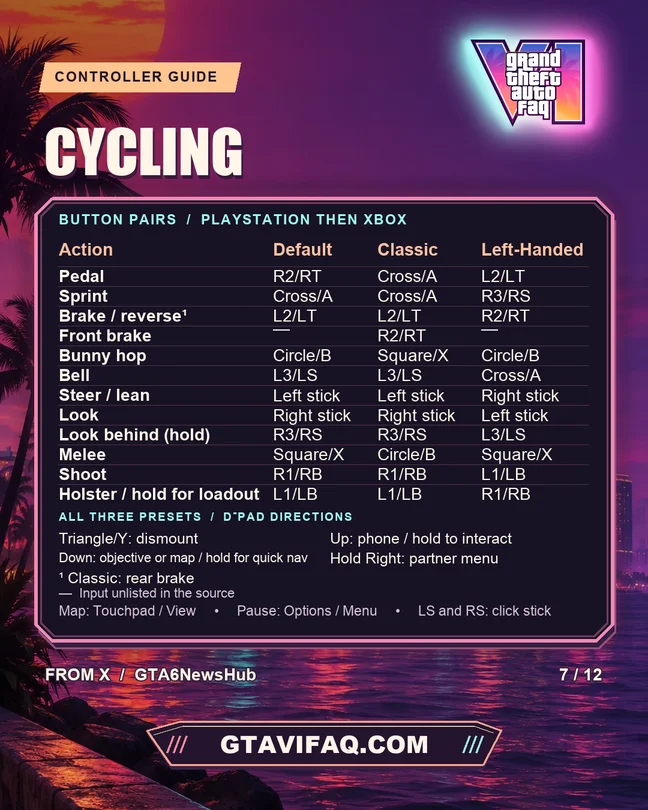
- Pedal — R2/RT, Cross/A, L2/LT. [7]
- Sprint — Cross/A, Cross/A, R3/RS. [7]
- Brake / reverse¹ — L2/LT, L2/LT, R2/RT. [7]
- Front brake — —, R2/RT, —. [7]
- Bunny hop — Circle/B, Square/X, Circle/B. [7]
- Bell — L3/LS, L3/LS, Cross/A. [7]
- Steer / lean — Left stick, Left stick, Right stick. [7]
- Across all presets: Triangle/Y: dismount. [7]
- Across all presets: ¹ Classic: rear brake. [7]
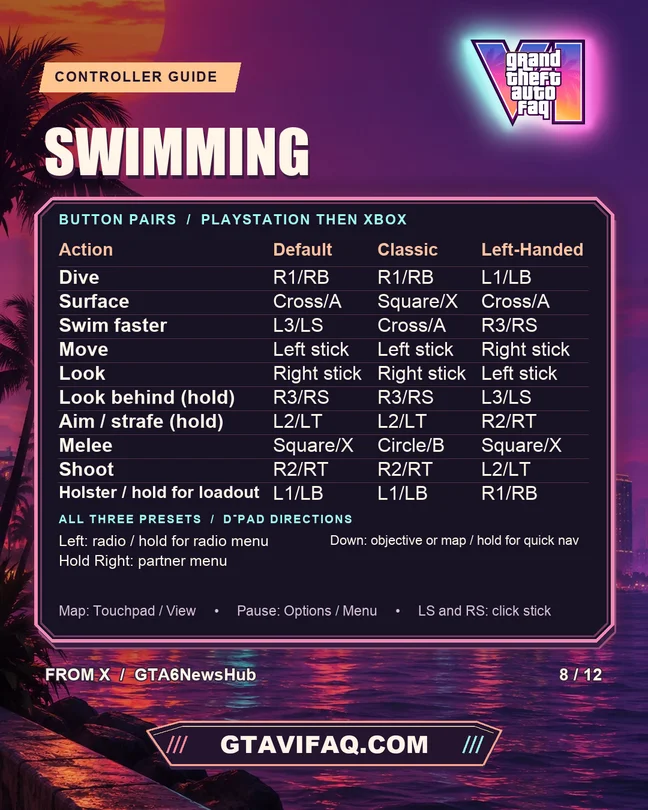
- Dive — R1/RB, R1/RB, L1/LB. [8]
- Surface — Cross/A, Square/X, Cross/A. [8]
- Swim faster — L3/LS, Cross/A, R3/RS. [8]
- Aim / strafe (hold) — L2/LT, L2/LT, R2/RT. [8]
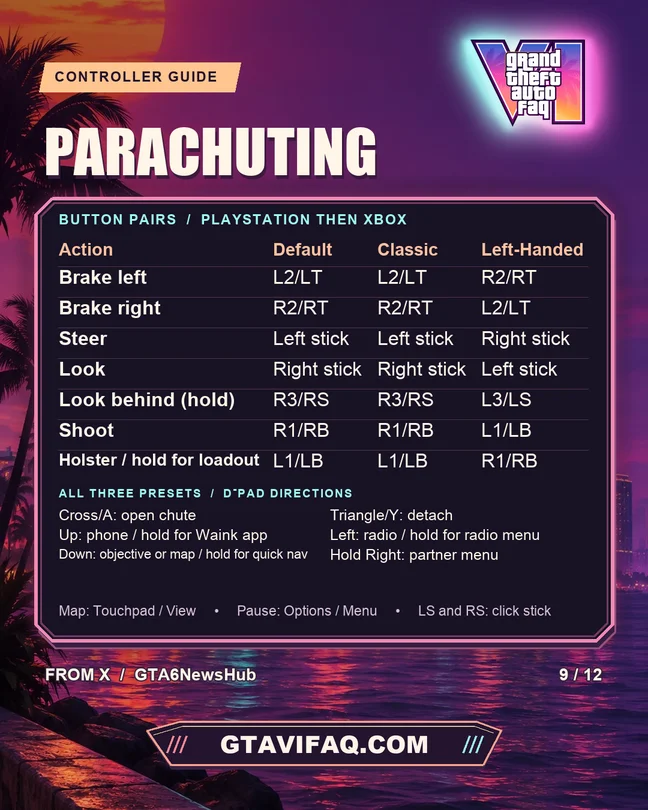
- Brake left — L2/LT, L2/LT, R2/RT. [9]
- Brake right — R2/RT, R2/RT, L2/LT. [9]
- Across all presets: Cross/A: open chute. [9]
- Across all presets: Triangle/Y: detach. [9]
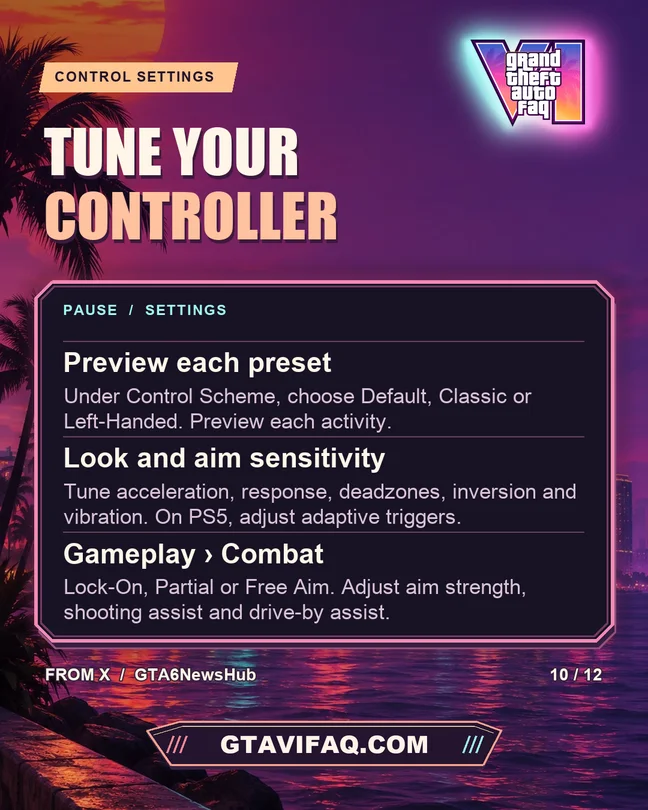
- Preview each preset. Under Control Scheme, choose Default, Classic or Left-Handed. Preview each activity. [10]
- Look and aim sensitivity. Tune acceleration, response, deadzones, inversion and vibration. On PS5, adjust adaptive triggers. [10]
- Gameplay › Combat. Lock-On, Partial or Free Aim. Adjust aim strength, shooting assist and drive-by assist. [10]
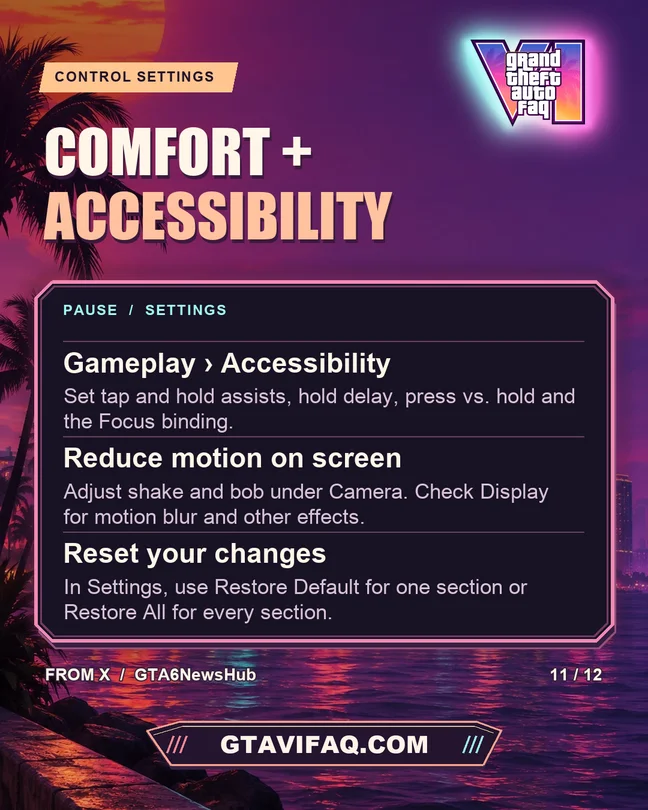
- Gameplay › Accessibility. Set tap and hold assists, hold delay, press vs. hold and the Focus binding. [10]
- Reduce motion on screen. Adjust shake and bob under Camera. Check Display for motion blur and other effects. [10]
- Reset your changes. In Settings, use Restore Default for one section or Restore All for every section. [10]
Sources & verification
These inputs come from GTA6NewsHub’s illustrated community guide. Match the selected layout in your in-game preview before using them.
 GTA6NewsHub on X
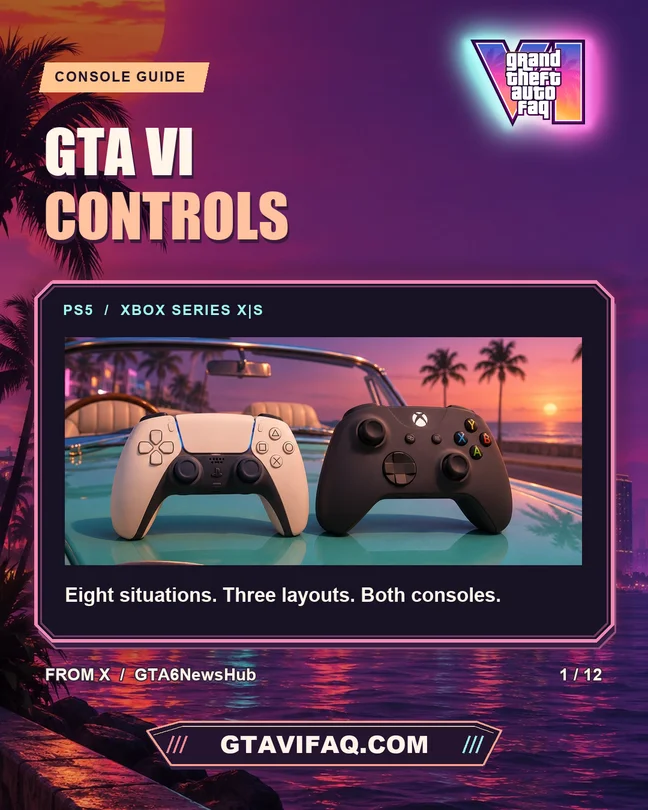
Ten community guide images introduce three console presets, compare eight activity maps and describe the settings menus.
Posted · Checked 2026-11-18 · 11:00 PM (23:00) UTCGTA6NewsHub on X
The ON FOOT control sheet compares Run, Move, Look, Jump / climb, Crouch, Rest (hold), Melee, Aim / interact (hold), Shoot, Take cover, Holster / hold for loadout, Look behind (hold) across Default, Classic and Left-Handed.
Posted · Checked 2026-11-18 · 11:00 PM (23:00) UTCGTA6NewsHub on X
The WHILE AIMING control sheet compares Aim / interact (hold), Shoot, Cover / hold for quick throw, Holster / hold for loadout, Zoom / show throw path, Run, Jump / climb, Crouch, Melee, Move, Look across Default, Classic and Left-Handed.
Posted · Checked 2026-11-18 · 11:00 PM (23:00) UTCGTA6NewsHub on X
The MELEE control sheet compares Punch / kick, Block / dodge, Grapple, Lock on / strafe (hold), Move, Look across Default, Classic and Left-Handed.
Posted · Checked 2026-11-18 · 11:00 PM (23:00) UTCGTA6NewsHub on X
The CARS + BOATS control sheet compares Accelerate, Brake / reverse, Steer, Look, Horn / nitrous, Look behind (hold), Headlights / hold to duck, Melee, Shoot, Holster / hold for loadout across Default, Classic and Left-Handed.
Posted · Checked 2026-11-18 · 11:00 PM (23:00) UTCGTA6NewsHub on X
The FLYING control sheet compares Throttle up, Throttle down, Pitch / roll, Look, Look behind (hold), Landing gear, Shoot, Holster / hold for loadout across Default, Classic and Left-Handed.
Posted · Checked 2026-11-18 · 11:00 PM (23:00) UTCGTA6NewsHub on X
The CYCLING control sheet compares Pedal, Sprint, Brake / reverse¹, Front brake, Bunny hop, Bell, Steer / lean, Look, Look behind (hold), Melee, Shoot, Holster / hold for loadout across Default, Classic and Left-Handed.
Posted · Checked 2026-11-18 · 11:00 PM (23:00) UTCGTA6NewsHub on X
The SWIMMING control sheet compares Dive, Surface, Swim faster, Move, Look, Look behind (hold), Aim / strafe (hold), Melee, Shoot, Holster / hold for loadout across Default, Classic and Left-Handed.
Posted · Checked 2026-11-18 · 11:00 PM (23:00) UTCGTA6NewsHub on X
The PARACHUTING control sheet compares Brake left, Brake right, Steer, Look, Look behind (hold), Shoot, Holster / hold for loadout across Default, Classic and Left-Handed.
Posted · Checked 2026-11-18 · 11:00 PM (23:00) UTCGTA6NewsHub on X
The last image lists preset preview, controller tuning, targeting and assists, accessibility, camera, display and reset options.
Posted · Checked 2026-11-18 · 11:00 PM (23:00) UTCEdit history
First published
Corrected · The original carousel selected a few bindings per activity. The expanded edition gives each listed binding for all three presets, shared controls and the remaining settings from photo ten.
Related answers

 Settings and controlsDoes GTA VI have a first-person mode?Written by GTA VI FAQ · Source: GamesRadar+ · Posted
 Settings and controlsWhich GTA VI settings should I change before playing?Written by GTA VI FAQ · Source: MetaForge (crazytrick) · Posted
 Settings and controlsHow should I set up my PS5 and display for GTA VI?Written by GTA VI FAQ · Source: Techjunkie_Aman on X · Posted
 GTA VI is live